
Download Aster Lab – AI‑Powered Video Summarization Tool for Learning
Overview
Aster Lab is a cutting‑edge web application that blends artificial intelligence with the everyday need to learn from video content. Designed specifically for YouTube, the platform automatically extracts the most important ideas from any video you choose, turning long‑form lectures, tutorials, or webinars into concise, easy‑to‑read summaries. But the experience doesn’t stop at reading; Aster Lab also creates custom quizzes based on the generated summary, letting users instantly test their comprehension and reinforce retention.
Whether you’re a college student trying to skim through dozens of recorded lectures, a professional upskilling with industry webinars, or a lifelong learner seeking to maximize the value of YouTube tutorials, Aster Lab provides a secure, free‑to‑try solution that can be upgraded to a full‑version license for unlimited access. The AI engine leverages natural‑language processing to understand spoken content, identify key concepts, and rewrite them in clear, learner‑friendly language. The result is a streamlined learning workflow: watch a video, receive a summary, answer a quiz, and move on with confidence.
Because it runs entirely in the browser, there’s no bulky software to install, and the service respects privacy by processing data on secure servers. In short, Aster Lab transforms passive video watching into an active, measurable learning experience, making it one of the most powerful tools in the AI‑enhanced education space today.
Key Features
- AI‑Generated Summaries: Uses advanced natural‑language processing to condense YouTube videos into short, readable paragraphs.
- Automatic Quiz Creation: Generates multiple‑choice questions directly from the summary to test retention.
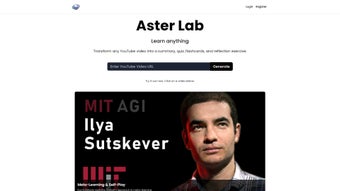
- One‑Click YouTube Integration: Paste any YouTube URL and receive results within seconds.
- Customizable Output Length: Choose between brief bullet‑point overviews or detailed paragraph summaries.
- Progress Tracking Dashboard: Monitor which videos you’ve summarized, quiz scores, and learning trends.
- Secure Cloud Processing: All AI computations happen on encrypted servers, ensuring your data stays private.
- Multi‑Language Support: Summaries and quizzes are available in English, Spanish, French, and German.
- Full‑Version License: Unlock unlimited summaries, higher‑accuracy AI models, and priority support.
- Responsive Web Design: Works seamlessly on desktops, tablets, and smartphones.
- Export Options: Download summaries and quizzes as PDF or plain text for offline study.
These features collectively address the most common pain points faced by video learners: time consumption, information overload, and lack of assessment tools. By automating both the extraction of core ideas and the creation of reinforcing quizzes, Aster Lab shortens the learning cycle dramatically. The platform’s flexibility—adjustable summary length, multilingual output, and export capabilities—makes it suitable for a broad audience, from high‑school students preparing for exams to corporate trainers developing micro‑learning modules. Moreover, the secure cloud architecture guarantees that sensitive educational content is never stored locally, aligning with institutional IT policies and personal privacy concerns.
Installation & Usage Instructions
Because Aster Lab is a web‑based solution, there is no traditional installation process. Follow these simple steps to start summarizing and quizzing your YouTube videos:
- Visit the Official Site: Open your preferred browser (Chrome, Edge, Firefox, Safari) and navigate to asterlab.com.
- Create an Account (Optional): While you can generate a single summary without an account, signing up unlocks the dashboard, progress tracking, and the ability to store quizzes for later review. Registration only requires an email address and a secure password.
- Enter a YouTube URL: Copy the link of the video you wish to study and paste it into the “Video URL” field on the homepage.
- Select Summary Preferences: Choose between “Brief” (3‑5 bullet points) or “Detailed” (full paragraph) and set the language if needed.
- Generate Summary: Click the “Summarize” button. The AI engine typically returns a result within 10‑20 seconds, depending on video length.
- Review & Edit (Optional): The generated summary appears in an editable text box. You can refine wording or add personal notes before saving.
- Create a Quiz: After the summary is finalized, click “Generate Quiz.” Aster Lab will produce 5‑10 multiple‑choice questions based on the key points.
- Take the Quiz: Answer the questions directly on the platform. Immediate feedback highlights correct answers and provides brief explanations.
- Export or Share: Use the “Download PDF” or “Copy Link” options to save your work or share it with classmates.
- Upgrade (If Desired): For unlimited usage, click the “Upgrade to Full Version” button. Payment is processed securely via Stripe or PayPal, and the license is applied instantly.
The entire workflow is designed to be intuitive, requiring no technical expertise. Because the tool runs in the browser, you benefit from automatic updates—whenever the developers improve the AI model or add new language support, you’ll see the enhancements the next time you load the page. If you encounter any issues, the Help Center offers step‑by‑step tutorials, and live chat support is available for full‑license users.
Compatibility & System Requirements
Aster Lab is a cloud‑based web application, which means it is compatible with any modern operating system that can run a contemporary web browser. The official supported environments include:
- Windows 10, 11: Chrome, Edge, Firefox, or Opera (latest version).
- macOS Catalina (10.15) and later: Safari, Chrome, or Firefox.
- Linux distributions: Any distro with a recent version of Chrome or Firefox.
- iOS 13+ and Android 9+: Mobile browsers such as Safari (iOS) and Chrome (Android) provide full functionality, including summary generation and quiz taking.
Because all processing occurs on Aster Lab’s secure servers, the local device only needs enough RAM to run the browser smoothly (2 GB minimum recommended) and a stable internet connection (minimum 3 Mbps download). No additional plugins, extensions, or local storage are required, making the tool especially attractive for users on shared or restricted computers (e.g., school labs or corporate environments). For users who prefer a more private experience, Aster Lab also offers a “Private Mode” that disables any data logging on the client side while still delivering AI‑generated results.
In terms of accessibility, the platform complies with WCAG 2.1 AA standards: text is resizable, contrast ratios meet guidelines, and all interactive elements are keyboard‑navigable. This ensures that learners with visual or motor impairments can equally benefit from the AI summarization and quiz features.
Pros, Cons, FAQ, and Final Verdict
Pros
- Instant AI‑driven summaries save hours of manual note‑taking.
- Automatically generated quizzes reinforce learning without extra effort.
- Web‑based – no installation, works on any device with a browser.
- Secure cloud processing protects user privacy.
- Multi‑language support broadens accessibility.
- Free tier available for casual users; affordable full‑version license.
Cons
- Accuracy may vary with heavily technical or heavily accented videos.
- Limited to YouTube; cannot summarize videos from other platforms.
- Quiz length is fixed; advanced users may desire customizable question counts.
- Requires an internet connection; offline use is not possible.
Frequently Asked Questions
Can I use Aster Lab with videos that are not public on YouTube?
Yes. As long as you have the direct URL and the video is not restricted by region or age, Aster Lab can process private or unlisted videos. You must be logged into a YouTube account that has permission to view the video.
How secure is my data when I submit a video link?
All data transmission is encrypted with TLS 1.3. The AI processing occurs on secure servers that do not store the original video content after summarization. Summaries and quizzes are only saved to your account if you choose to store them.
Is there a limit to the number of videos I can summarize per day?
The free tier allows up to 5 summaries per day. Full‑version license holders enjoy unlimited summarizations and priority processing.
Can I customize the difficulty of the generated quizzes?
Currently, quizzes are generated at a medium difficulty level based on key concepts. Future updates aim to add difficulty sliders and custom question types.
Do I need a Google account to use Aster Lab?
No. Aster Lab only requires the YouTube video URL. However, signing up for an Aster Lab account (which can be done with any email) enables saving progress and accessing premium features.
Final Verdict & Call to Action
Aster Lab bridges a critical gap in modern e‑learning by turning passive video consumption into an active study session. Its AI‑generated summaries and instant quizzes empower learners to retain more information in less time, all without the hassle of installing heavyweight software. While it currently supports only YouTube and relies on an internet connection, the benefits—speed, security, and multi‑platform accessibility—far outweigh these minor limitations for most users. For students seeking a competitive edge during exam season, professionals who need to stay updated with industry webinars, or anyone who simply wants to make the most of YouTube’s educational treasure trove, Aster Lab is a worthwhile addition to your digital toolkit.
Ready to transform the way you learn from videos? Download Aster Lab now, start with the free tier, and experience faster, smarter learning today. Upgrade to the full version whenever you’re ready to unlock unlimited summaries, higher‑accuracy AI, and priority support.
Aster Lab delivers a compelling mix of AI summarization and assessment tools that make YouTube a serious study platform. The interface is clean, the results are quick, and the optional quizzes provide a measurable way to gauge comprehension. Minor drawbacks like limited platform support are outweighed by its core strengths. Overall, a solid 4.5‑star rating for anyone serious about video‑based learning.



.png)



